Engineering overview
How Will Genetec Security Center Hold Up After Five Years in Operation?
Updating camera firmware is one of the most routine tasks in operating a video surveillance system.
With some manufacturers, a firmware update may reset the camera to its factory defaults, requiring any settings tuned for the specific scene to be restored. For some devices, the update is performed not through the Genetec Security Center security management platform, but using the device manufacturer’s own utility.
In a heterogeneous system, this is a normal part of operations: different devices have their own release cycles and update procedures.
Question
Yet even a routine task like this raises a question that matters throughout the system’s lifecycle: when something changes, how far can the impact spread?
An Update That Doesn’t Become a Project of Its Own
In a system with several hundred cameras, it is difficult to keep track of which firmware version is running on each model and which versions have been validated against the current platform release. As a result, updates are often postponed or carried out without a complete view of compatibility, while outdated firmware can leave vulnerabilities on the site network that the manufacturer addressed long ago.
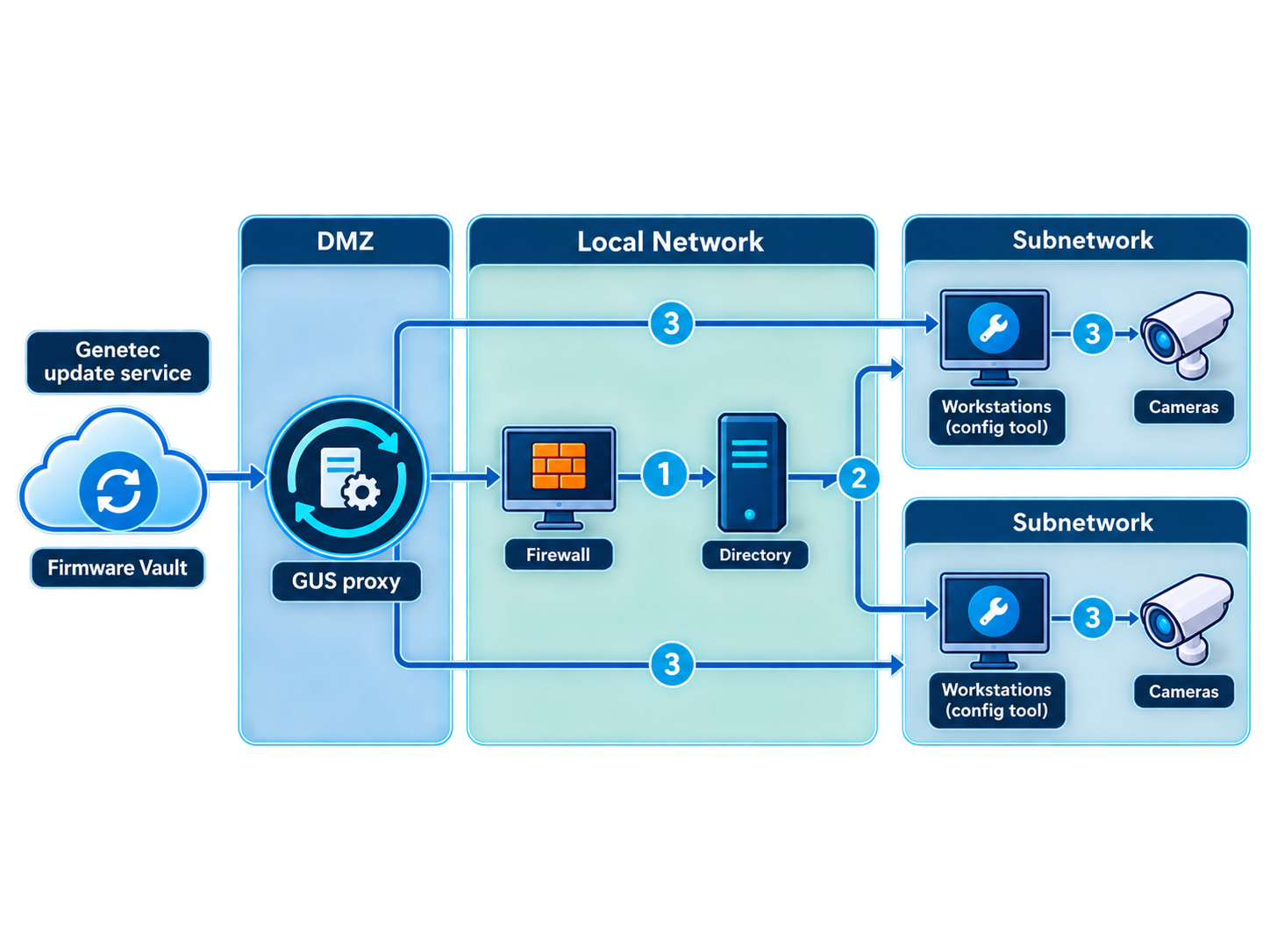
Security Center takes some of this tracking burden off the engineering team: it monitors new firmware releases and their compatibility with your system, notifies you when a compatible version becomes available for an installed camera, and provides information about the update — including whether it addresses known vulnerabilities. This capability is called Firmware Vault. For supported manufacturers, firmware can also be downloaded and deployed directly from the platform interface. Coverage is not universal: the hardware inventory report shows exactly which of the installed camera models are covered.
Updates are delivered from external sources through the Genetec Update Service, which can connect to the internet through an intermediary node located in a separate network segment (DMZ). This way, only one controlled node communicates externally rather than every server in the system.
The same principle applies to servers and workstations: an update does not necessarily mean moving to the latest version. A specific version can be selected and pinned for each machine, and the platform checks its compatibility before installation. Even then, after the change, an engineer still verifies on the live system that everything defined in the project continues to work as intended.
A managed update is not about having a single button to press. It means knowing in advance what will change, what the compatibility assessment is based on, and what needs to be verified afterward.
But this only applies to planned changes. Other changes accumulate outside the plan, and after several years, they raise a more difficult question.
A Server with a Known Baseline
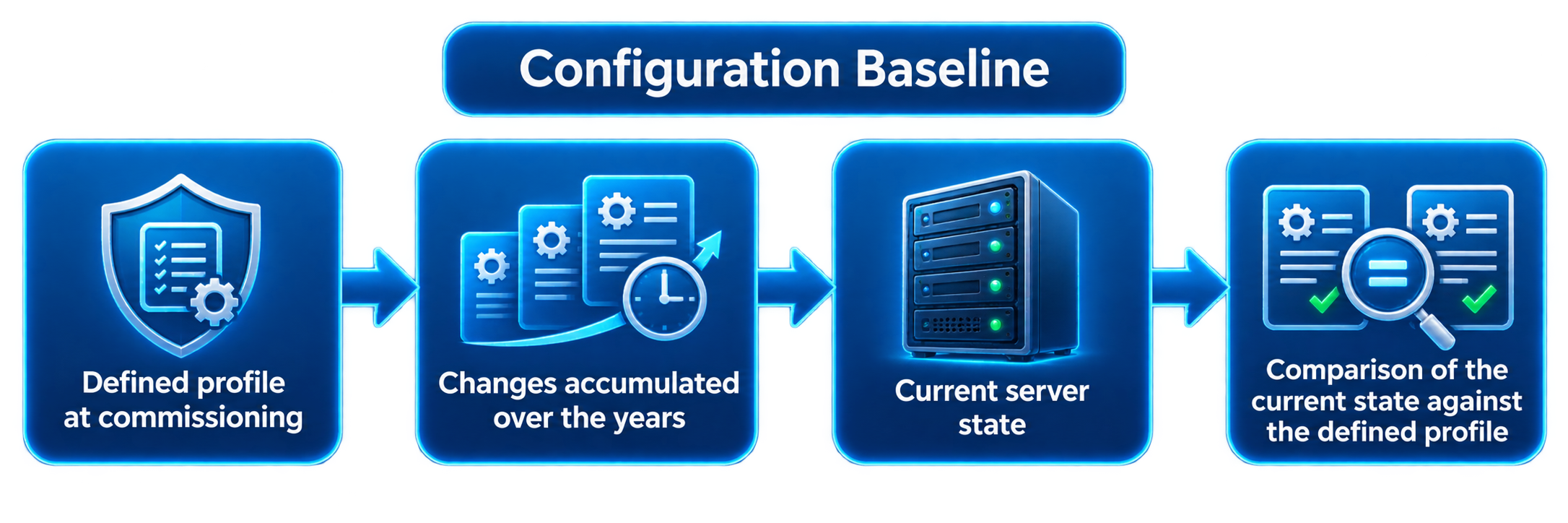
Three years later, the server is still running. But does its configuration still match the state in which the system was originally commissioned? Someone may have enabled file sharing to transfer archived footage; someone else may have disabled the firewall during commissioning. Each change had a reason at the time, but several years later, reconstructing the complete picture is no longer straightforward.
For this, Genetec offers Streamvault, a preconfigured hardware and software platform. Its servers and workstations come with the operating system, Security Center, and tools for managing the device’s own configuration. Here, a hardened configuration is not a one-time setup performed during commissioning, but a state that is actively managed over time.
These settings are defined through the server’s web portal. If the corresponding Windows settings are changed manually, those changes remain in effect until the configuration is next applied through the portal, at which point they are overwritten. The portal remains the source of truth for the server’s configuration.
The baseline itself is selected from several predefined hardened configuration profiles, and the server ships with one of the more restrictive profiles already applied. Common relaxations, such as enabling Remote Desktop, are disabled by default, and each proposed change is evaluated against the selected profile: some changes may take the server outside that profile.
Years later, this provides the key advantage: when you need to determine whether the server still matches the state that was originally accepted, there is a known baseline — the selected profile — rather than a configuration reconstructed from memory. The machine’s current state can be compared against that baseline instead of piecing together its change history from whatever traces remain.
Trade-off
A more restrictive profile may come at the cost of operational convenience and performance, however, so the appropriate profile is selected based on the actual threats relevant to the site.
When a New System Wasn’t Part of the Original Design
A few years later, it is not only the devices that have changed — the requirements have changed as well. The security team now needs data from building and industrial systems that were not part of the original requirements: equipment status, power conditions, and signals from industrial automation systems. A common solution is to add another console alongside the operator’s workstation. Technically, the systems are integrated, but the operator is still left to reconcile two separate operational views.
To bring this data into Security Center itself, the Industrial IoT plugin connects to building and industrial systems using industrial protocols. What matters is not which protocols appear on the supported list, but what an external value becomes once it enters the platform: an individual data point with its own state and access permissions.
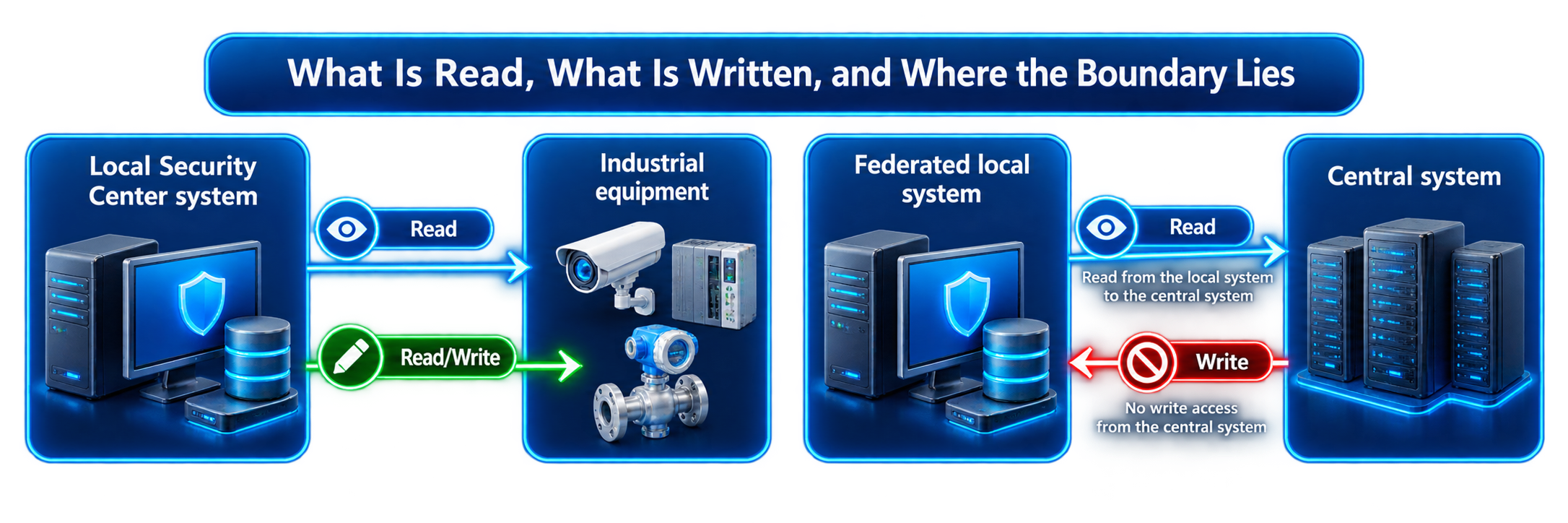
Access permissions matter because different types of data are handled differently. The system may only read the temperature in an equipment room, while a parameter setpoint or a command to controlled equipment may also be written back. Each data point therefore has its own access level: read-only or read/write. With BACnet, a widely used protocol for building systems, that access level is determined by the object type itself: measured values are read-only, while outputs and controllable values can also be written.
From a lifecycle perspective, the point is not BACnet itself. Years later, a new class of data can be added to the system without redesigning the operator environment around yet another separate console.
These boundaries are defined by the architecture. Across distributed sites, multiple independent Security Center systems can be connected for centralized operation: the central system can see industrial data from remote systems, but it cannot write values to their data points.
The same principle applies to life-safety systems: their BACnet objects are read-only. Security Center presents their status to the operator as part of the overall operational view, but it does not take over the functions of the specialized system responsible for those processes.
There is also the reverse scenario: sending events and status information from Security Center to an external supervisory or monitoring system. This is handled by a separate plugin, Industrial Protocol Interface. It only sends data outward and does not require an operator workstation.
What Does “Supported” Really Mean?
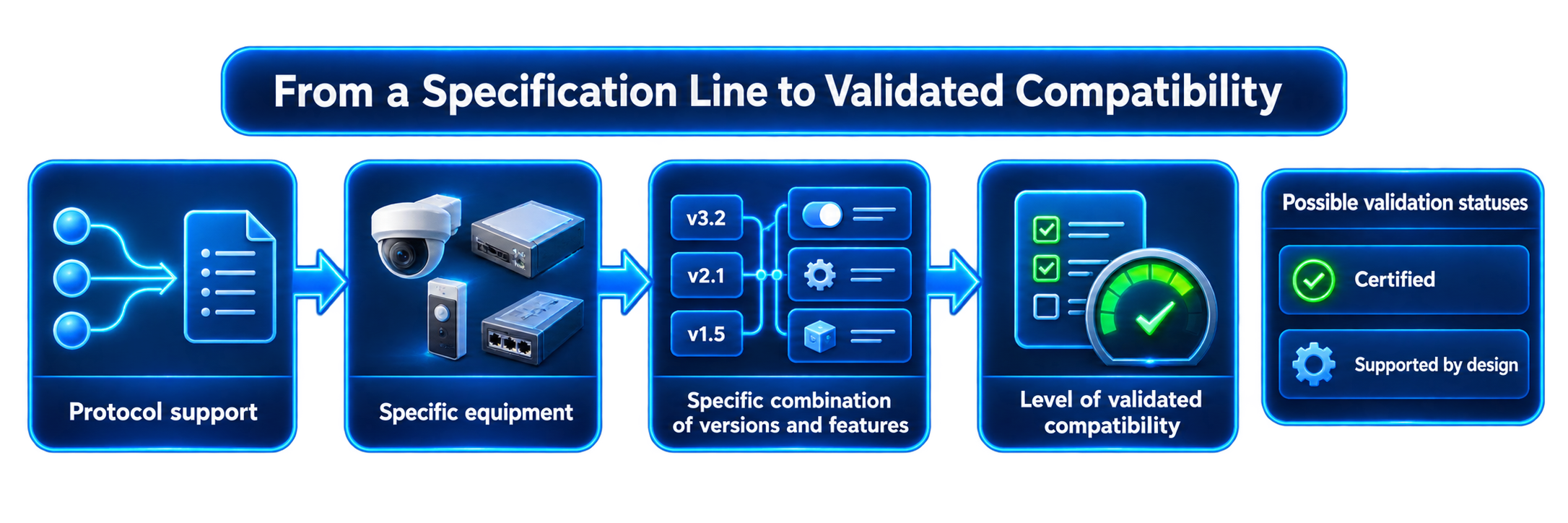
In a specification, integration is often reduced to a single line: “supports BACnet” or “integrates with system X.” For a real project, that is not enough. That line does not tell you whether the specific combination of device and software versions has been tested, how thoroughly compatibility has been validated, or what will need to be revalidated after the next update.
For industrial integrations, the level of validated compatibility is indicated by two statuses.
- Certified means that Genetec has tested and validated the specific device or device type.
- Supported by design means that the device shares the same design characteristics as a certified device, although it has not undergone separate validation.
This also highlights the distinction between a protocol and a device: support for the industrial protocols themselves is classified as Supported by design, while Certified status applies to specific devices that have been tested — including industrial controllers, fire alarm panels, and environmental and power monitoring sensors. For cameras and access control controllers, compatibility is determined through their respective compatibility lists.
For a system designer, the distinction is practical: the status shows what can already be relied on and what should still be validated for the specific use case — before commissioning begins. If an integration is critical or will be replicated across multiple sites, the required combination of software versions can first be validated in a test environment or at a pilot site, then used as a proven baseline for subsequent deployments. Technical support is also tied to that combination: it is available when the plugin is deployed with versions of Security Center and third-party software that have Certified or Supported by design status.
From a lifecycle perspective, what matters is not simply whether a protocol is supported, but how predictably a validated combination of components will behave after the next change.
What You See on Day One — and What You See Three Years Later
- On the day the system is commissioned, the cameras are recording, the doors are opening, and events are reaching the operator. At that point, many architectural differences simply have not had time to reveal themselves.
- Those differences become visible later. Three to five years into operation, hundreds of cameras need firmware updates, some equipment needs to be replaced, new versions of the platform and plugins are released, and cybersecurity requirements evolve. Building and industrial systems that were never considered during the original design are added, while existing integrations need to be updated without disrupting the rest of the system. New requirements also emerge that did not exist when the system was originally designed.
This is where managed firmware updates, a server with a defined baseline, the ability to add new types of data without introducing another operator console, and a clearly defined validation scope for each integration become valuable.
None of these mechanisms eliminates change. What they provide instead is predictability: the ability to understand in advance which parts of the system a change will affect and what will need to be verified afterward.